Optimization Guide
ARC-SCOPE optimisation calibrates selected SCOPE parameters against observed
targets after ARC has retrieved the canopy state. ARC outputs such as LAI,
Cab, and Cw remain fixed. The optimiser changes only the parameters you
choose in optim_config, runs SCOPE repeatedly, and keeps the parameter values
that reduce the configured loss.
Use optimisation when you have observations that correspond to SCOPE outputs:
- SIF observations for the fluorescence workflow.
- Thermal radiance or land-surface-temperature-like observations for the thermal workflow.
- SIF, thermal, or flux observations for the coupled
energy-balanceworkflow.
What the Runner Does
When PipelineConfig.optimize=True, optim_config["enabled"] = True, or a
nested runner payload contains optim.enabled, ArcScopePipeline.run() changes
from a single forward simulation to this loop:
- Run ARC, bridge, weather, geometry, and SCOPE input preparation as usual.
- Load observations from
optim_config["observations"]orobservations_path. - Choose parameters from
optim_config["parameters"],parameter_preset, or the workflow default. - Inject trial parameter values into the prepared SCOPE input dataset.
- Run SCOPE and compare selected output variables with observations.
- Minimise the scalar loss with scipy.
- Inject the optimised parameters and run one final SCOPE simulation.
- Return the optimised input, output, and
OptimizationResult.
Target names must match SCOPE output names
target_variables are SCOPE output variable names, not generic labels.
Run a baseline simulation first and inspect result.scope_output_ds.data_vars
if you are unsure which names your installed scope-rtm version emits.
Shared Configuration Pattern
Every optimisation run needs observations and target variables:
from arc_scope.pipeline import ArcScopePipeline, PipelineConfig

config = PipelineConfig(
    geojson_path="field.geojson",
    start_date="2021-05-15",
    end_date="2021-10-01",
    crop_type="wheat",
    start_of_season=170,
    year=2021,
    scope_workflow="fluorescence",
    scope_root_path="./upstream/SCOPE",
    optim_config={
        "enabled": True,
        "observations_path": "observed_sif.nc",
        "target_variables": ["F740"],
    },
)

result = ArcScopePipeline(config).run()
summary = result.optimization_result
observations_path should point to a NetCDF dataset with variables matching
target_variables. You can also pass an in-memory xarray.Dataset:
import xarray as xr

observations = xr.Dataset(
    {"F740": ("time", observed_f740_values)},
    coords={"time": observation_times},
)

config.optim_config["observations"] = observations
ARC-SCOPE aligns predictions and observations by shared xarray coordinates
before comparing finite values. If a SCOPE target is gridded, for example
(y, x, time), and the observation is a point time series, for example
(time,), choose the pixel explicitly:
config.optim_config["pixel_selector"] = {"y": tower_y, "x": tower_x}
For positional indices instead of coordinate labels, use:
config.optim_config["pixel_selector"] = {
    "y": {"isel": tower_y_index},
    "x": {"isel": tower_x_index},
}
If you intend to fit a field average, average the model output or observations
to matching dimensions before optimisation. ARC-SCOPE raises ValueError when
the target arrays cannot be aligned by coordinates.
Choosing Parameters
If parameters is omitted, ARC-SCOPE uses a workflow default:
| Workflow | Default parameters | Typical observation target |
|---|---|---|
fluorescence |
fqe |
SIF, e.g. F740 or F685 |
thermal |
Tcu, Tch, Tsu, Tsh |
thermal output, e.g. Loutt or Lot_ |
energy-balance |
fqe, rss, rbs, Cd, rwc |
mixed SIF, thermal, and flux outputs |
You can override the defaults with explicit parameter specs:
"parameters": [
    {
        "name": "fqe",
        "initial": 0.01,
        "lower": 0.001,
        "upper": 0.1,
        "transform": "log",
    },
    {
        "name": "rss",
        "initial": 500.0,
        "lower": 10.0,
        "upper": 5000.0,
        "transform": "log",
        "optimize": False,
    },
]
transform controls how scipy sees the parameter:
identity: optimise directly, clipped to bounds.log: optimise positive parameters such asfqe,rss,rbs, andCd.logit: optimise values bounded between lower and upper, such asrwc.
optimize=False keeps a parameter fixed while still injecting it into the SCOPE
input dataset.
Scipy Gradients
For real ArcScopePipeline SCOPE runs, scipy optimisation now uses a
tensor-preserving SCOPE objective path by default. The optimiser still uses
robust L-BFGS-B, but its jac callable is computed by one PyTorch backward
pass in the unconstrained parameter space instead of scipy probing each
parameter with finite differences.
"optimizer": {
    "type": "scipy",
    "method": "L-BFGS-B",
    "use_autograd_jac": "required",
}
use_autograd_jac options:
"required": use the tensor-preserving SCOPE objective and raise if autograd is unavailable or the forward path detached. This is the production default forArcScopePipelineruns that use the built-in SCOPE runner."auto": use autograd when the forward path is differentiable; otherwise fall back to scipy finite differences. This is intended for proxy examples, custom numpy-only runners, and exploratory compatibility checks.False: disable the jacobian hook and use scipy's finite-difference path.
The differentiable path calls SCOPE's raw tensor-returning workflow methods
(run, run_layered_fluorescence, run_thermal, and coupled
energy-balance tensor methods) and computes the loss before xarray/NetCDF
assembly. The normal dataset runner is still used for initial/final reported
outputs, but not for autograd gradient evaluation because upstream dataset
assembly detaches tensors for export.
Chunked SCOPE Execution
For larger fields, set the SCOPE batch size before optimisation. ARC-SCOPE
passes this value to upstream scope-rtm as SimulationConfig.chunk_size, so
the heavy SCOPE forward pass processes the stacked y/x/time cells in chunks
instead of one dense batch.
For autograd gradients, ARC-SCOPE uses the upstream streaming tensor iterator
and calls backward() on each chunk loss before requesting the next chunk. This
is the part that makes scope_chunk_size reduce peak autograd memory. Calling
run_scope_tensors() or run_scope_dataset(..., return_tensors=True) and then
doing one full-batch loss.backward() still keeps every chunk graph alive.
config = PipelineConfig(
    ...,
    scope_workflow="fluorescence",
    scope_chunk_size=512,
    optim_config={
        "enabled": True,
        "batch_size": 256,
        "observations_path": "observed_f740.nc",
        "target_variables": ["F740"],
        "optimizer": {
            "type": "scipy",
            "method": "L-BFGS-B",
            "use_autograd_jac": "required",
        },
    },
)
Precedence is:
optim_config["scope_chunk_size"],optim_config["chunk_size"], oroptim_config["batch_size"].- The same keys inside nested runner payloads such as
optim_config["optim"]["batch_size"]. scope_options["scope_chunk_size"],scope_options["chunk_size"], orscope_options["batch_size"].PipelineConfig.scope_chunk_size.
Use smaller chunks when SIF, thermal, or energy-balance optimisation hits GPU
or CPU memory limits. Use 0, None, or "disabled" only when you explicitly
want SCOPE to process the full stack at once.
Upstream SCOPE Differentiability Requirements
ARC-SCOPE can only compute real gradients for target variables whose SCOPE
forward path remains connected to the optimised PyTorch tensors. The upstream
SCOPE code path used during use_autograd_jac="required" must satisfy these
requirements:
- Inputs consumed by the SCOPE solver are
torch.Tensorobjects on the configured dtype/device. - Optimised variables are not converted through
xarray.DataArray.values,np.asarray,.detach(),.cpu().numpy(), or Pythonfloat()before the loss is computed. - Workflow methods return raw
torch.Tensoroutputs for the configured target variables. xarray/NetCDF assembly happens only after optimisation, for the reported final run. - Tensor-dependent branching uses differentiable torch operations such as
torch.where, masks, and tensor reductions. Parameter-dependent.item()branches break the graph. - Constants and default values used with tensors are created with torch on the same dtype/device, not as NumPy arrays that force implicit conversion.
- Iterative solvers avoid in-place tensor updates that invalidate autograd.
- The selected
target_variablesactually depend on the selected parameters. For example, standalonethermaldepends onTcu,Tch,Tsu, andTsh;rssandrbsaffect the coupledenergy-balancebranch, not the prescribed-temperature thermal branch.
If any of these conditions fail, "required" raises instead of silently
publishing an unoptimised or finite-difference-only run. Use "auto" only when
you deliberately want compatibility fallback for custom or proxy runners.
Real ARC/SCOPE Optimisation Run
The figure below is from a live ARC/SCOPE run, not the lightweight proxy
generator. It used the bundled Belgium field, local weather forcing, cached
Sentinel-2 acquisitions, and upstream scope-rtm under upstream/SCOPE.
ARC-SCOPE first ran a real fluorescence workflow to prepare and simulate SCOPE
inputs, then fitted fqe against an F740 target.
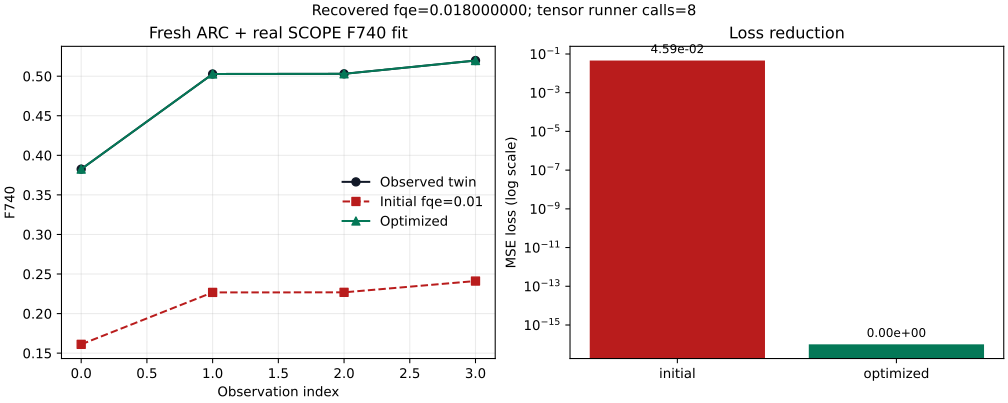
This was a twin-observation validation run: the target F740 observations were
generated by real SCOPE with a known fqe=0.018, then the optimiser started
from fqe=0.01 and had to recover that value. It validates the optimisation
mechanics and differentiable SCOPE path. It is not a claim that the fitted
parameter is scientifically validated against an external satellite SIF product.
Run summary from
real_scope_summary.json:
| Quantity | Value |
|---|---|
| Source path | ARC retrieval -> bridge -> local weather -> upstream SCOPE fluorescence |
| Target variable | F740 |
| SCOPE input size | time=4, y=2, x=2, wavelength=2001, excitation_wavelength=71 |
Initial fqe |
0.01 |
Generating fqe for twin observations |
0.018 |
Optimised fqe |
0.017999999821379092 |
| Initial loss | 0.04591071605682373 |
| Optimised loss | 0.0 |
Initial mean F740 |
0.21395820379257202 |
Observed mean F740 |
0.4770224690437317 |
Optimised mean F740 |
0.4770224690437317 |
| Optimiser | scipy:L-BFGS-B |
| Autograd mode | use_autograd_jac="required" |
| Tensor SCOPE runner calls | 8 |
| Fresh ARC/SCOPE forward time | 25.88 s |
| Optimisation time | 5.53 s |
The progression is:
- ARC retrieves the crop state and the bridge prepares SCOPE inputs. These
variables, such as
LAI,Cab, andCw, stay fixed during optimisation. - The initial SCOPE run uses
fqe=0.01; its meanF740is too low (0.213958versus the target mean0.477022). - L-BFGS-B evaluates trial
fqevalues. Withuse_autograd_jac="required", each jacobian evaluation goes through the tensor-preserving SCOPE objective and one PyTorch backward pass instead of scipy finite differences. - The fitted parameter reaches
fqe=0.018, the loss falls from0.04591to0.0, and the final SCOPE output overlays the target in the plot. - The final
scope_input_dsandscope_output_dscarryarc_scope_optimization_*attrs so manifests can distinguish this run from an unoptimised forward simulation.
For a real observed-SIF run, keep the same configuration shape but provide your measured observation dataset instead of generating a twin target:
from arc_scope.pipeline import ArcScopePipeline, PipelineConfig

config = PipelineConfig(
    geojson_path="field.geojson",
    start_date="2021-05-15",
    end_date="2021-10-01",
    crop_type="wheat",
    start_of_season=170,
    year=2021,
    scope_workflow="fluorescence",
    scope_root_path="./upstream/SCOPE",
    device="cpu",
    dtype="float32",
    optim_config={
        "enabled": True,
        "observations_path": "observed_f740.nc",
        "target_variables": ["F740"],
        "parameters": [
            {
                "name": "fqe",
                "initial": 0.01,
                "lower": 0.001,
                "upper": 0.1,
                "transform": "log",
            }
        ],
        "optimizer": {
            "type": "scipy",
            "method": "L-BFGS-B",
            "use_autograd_jac": "required",
        },
        "max_iter": 50,
        "tol": 1e-6,
    },
)

result = ArcScopePipeline(config).run()
fit = result.optimization_result
print(fit.parameters_initial)
print(fit.parameters_optimized)
print(fit.initial_loss, fit.optimized_loss, fit.converged)
The observation NetCDF must contain an F740 variable with coordinates that
overlap the model output after any configured pixel_selector has been
applied. If the external product uses different naming or units, rename and
convert it before passing it to observations_path.
Generated Example Artifacts
The figures and numeric outputs below are generated by a reproducible script:
PYTHONPATH=src python -m arc_scope.experiments.optimization_examples \
  --output-dir docs/assets/optimization
The same generator is exposed through the installed console script
arcope-optimization-examples, the local example
python examples/07_optimization_examples.py, and the Pixi task
pixi run optimization-examples.
The generator needs matplotlib for SVG output; install arcope[docs] or use
the repository Pixi environment.
The script uses deterministic proxy SCOPE runners so the documentation can be
rebuilt without live ARC retrieval, ERA5 credentials, or scope-rtm runtime
assets. It still exercises ARC-SCOPE's real optimisation path:
run_pipeline_optimization(), ScopeObjective, ParameterSet, and
ScipyOptimizer.
Generated files:
Proxy examples vs scientific production runs
These generated examples are real optimisation outputs from runnable code,
but their forward model is a deterministic proxy. For scientific outputs,
use the same configuration pattern with ArcScopePipeline.run() and real
SCOPE target variables from your installed scope-rtm workflow.
Example 1: Fit SIF by Tuning fqe
Use this for experiments where SIF is the scientific target. The fluorescence
workflow defaults to the SIF preset, so the explicit parameters block below is
optional but recommended for auditability.
config = PipelineConfig(
    geojson_path="field.geojson",
    start_date="2021-05-15",
    end_date="2021-10-01",
    crop_type="wheat",
    start_of_season=170,
    year=2021,
    scope_workflow="fluorescence",
    scope_root_path="./upstream/SCOPE",
    save_scope_netcdf=True,
    optim_config={
        "enabled": True,
        "observations_path": "observed_sif.nc",
        "target_variables": ["F740"],
        "parameters": [
            {
                "name": "fqe",
                "initial": 0.01,
                "lower": 0.001,
                "upper": 0.1,
                "transform": "log",
            }
        ],
        "optimizer": {
            "type": "scipy",
            "method": "L-BFGS-B",
            "use_autograd_jac": "required",
        },
        "max_iter": 50,
        "tol": 1e-6,
    },
)

result = ArcScopePipeline(config).run()
fit = result.optimization_result
print(fit.parameters_initial)
print(fit.parameters_optimized)
print(fit.initial_loss, fit.optimized_loss)
Generated output from docs/assets/optimization/summary.json:
{'fqe': 0.01}
{'fqe': 0.0180}
10.423289 0.000047
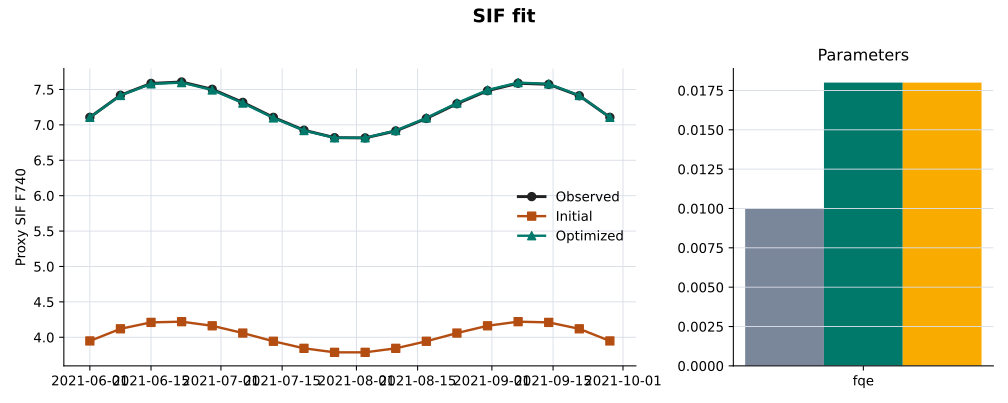
Interpretation:
fqeincreased from0.01to0.0180, so the initial fluorescence yield was too low for the observed SIF.optimized_loss < initial_loss, so the fitted SCOPE output is closer to the observations under the configured MSE objective.- The final
result.scope_output_dsis the SCOPE run with the fittedfqe, not the original forward simulation.
Example 2: Fit Standalone Thermal Outputs by Tuning Prescribed Temperatures
Use this when the target is thermal radiance or a thermal product derived from
the standalone thermal workflow. This workflow uses prescribed sunlit/shaded
canopy and soil temperatures, so the default thermal preset tunes Tcu, Tch,
Tsu, and Tsh. Use the coupled energy-balance workflow when you want to
fit soil and aerodynamic resistance parameters such as rss and rbs.
config = PipelineConfig(
    geojson_path="field.geojson",
    start_date="2021-05-15",
    end_date="2021-10-01",
    crop_type="wheat",
    start_of_season=170,
    year=2021,
    scope_workflow="thermal",
    scope_root_path="./upstream/SCOPE",
    optim_config={
        "enabled": True,
        "observations_path": "observed_thermal.nc",
        "target_variables": ["Loutt", "Eoutt"],
        "parameter_preset": "thermal",
        "optimizer": {
            "type": "scipy",
            "method": "L-BFGS-B",
            "use_autograd_jac": "required",
        },
        "max_iter": 80,
        "tol": 1e-6,
    },
)

result = ArcScopePipeline(config).run()
fit = result.optimization_result
Generated output from docs/assets/optimization/summary.json:
fit.parameters_initial
# {'Tcu': 25.0, 'Tch': 24.0, 'Tsu': 30.0, 'Tsh': 27.0}

fit.parameters_optimized
# {'Tcu': 30.3910, 'Tch': 27.1240, 'Tsu': 33.3146, 'Tsh': 28.4856}

fit.initial_loss, fit.optimized_loss
# (5.695558, 0.000356)
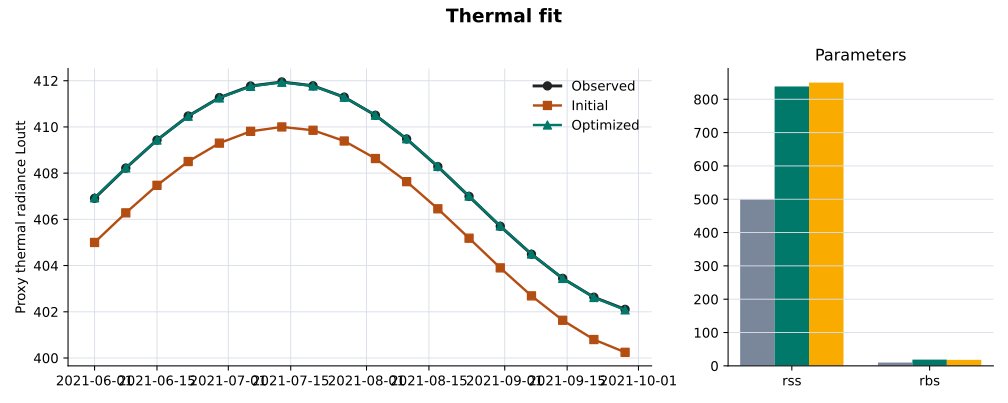
Interpretation:
TcuandTchare the prescribed sunlit and shaded canopy temperatures used by SCOPE thermal radiance.TsuandTshare the prescribed sunlit and shaded soil temperatures.- These values are calibration parameters for the configured observations and period. They are not ARC retrieval products, and they replace the diagnostic thermal state for the optimised final run.
If your SCOPE output uses a different thermal variable name, change
target_variables. Common candidates are Loutt, Lot_, Eoutt, or a
postprocessed LST variable if you add one to the output dataset.
Example 3: Fit Coupled Energy Balance
Use energy-balance when the run should fit fluorescence and thermal/flux
behavior in the coupled branch. The default preset tunes:
fqe: fluorescence quantum efficiencyrss: soil surface resistancerbs: boundary-layer resistanceCd: drag coefficientrwc: relative water content
config = PipelineConfig(
    geojson_path="field.geojson",
    start_date="2021-05-15",
    end_date="2021-10-01",
    crop_type="wheat",
    start_of_season=170,
    year=2021,
    scope_workflow="energy-balance",
    scope_root_path="./upstream/SCOPE",
    scope_options={"soil_heat_method": 2},
    optim_config={
        "enabled": True,
        "observations_path": "observed_energy_balance.nc",
        "target_variables": ["F740", "Loutt", "LE"],
        "parameter_preset": "energy-balance",
        "optimizer": {
            "type": "scipy",
            "method": "L-BFGS-B",
            "use_autograd_jac": "required",
        },
        "max_iter": 120,
        "tol": 1e-6,
    },
)

result = ArcScopePipeline(config).run()
fit = result.optimization_result
Generated output from docs/assets/optimization/summary.json:
fit.parameters_initial
# {'fqe': 0.01, 'rss': 500.0, 'rbs': 10.0, 'Cd': 0.2, 'rwc': 0.5}

fit.parameters_optimized
# {'fqe': 0.0162, 'rss': 708.5325, 'rbs': 14.4040, 'Cd': 0.3202, 'rwc': 0.5902}

fit.initial_loss, fit.optimized_loss
# (60.651931, 0.000868)
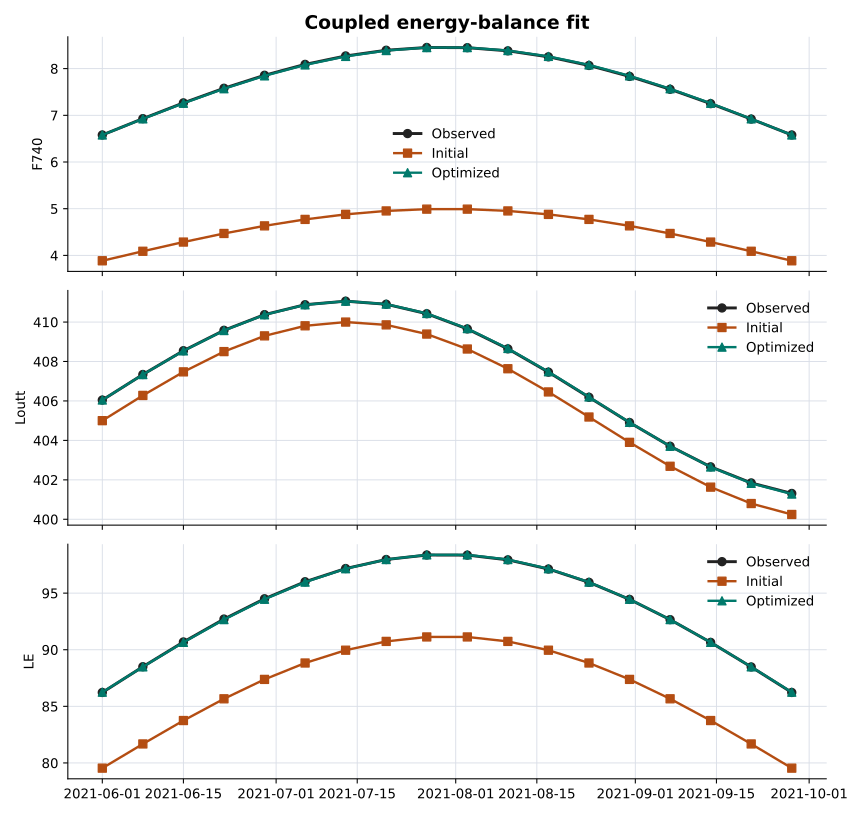
Interpretation:
- The optimiser is fitting all targets with one scalar loss.
- The final parameter set is a compromise across SIF, thermal, and flux targets.
- If one target has much larger numeric units than another, the default MSE can be dominated by that target.
For mixed-unit fitting, normalise observations before fitting or provide a
custom loss_fn that returns comparable magnitudes for each target. The current
runner calls loss_fn(predicted, observed) once per target and sums the returned
losses.
Example 4: Fit Only One Parameter in a Larger Workflow
You can run the energy-balance workflow while fitting only SIF yield and holding thermal parameters fixed:
optim_config = {
    "enabled": True,
    "observations_path": "observed_sif_for_energy_balance.nc",
    "target_variables": ["F740"],
    "parameters": [
        {"name": "fqe", "initial": 0.01, "lower": 0.001, "upper": 0.1, "transform": "log"},
        {"name": "rss", "initial": 500.0, "lower": 10.0, "upper": 5000.0, "transform": "log", "optimize": False},
        {"name": "rbs", "initial": 10.0, "lower": 1.0, "upper": 100.0, "transform": "log", "optimize": False},
    ],
}
This is useful when you want the coupled model physics but only trust one class of observations for calibration.
The generated parameter summary compares initial values, fitted values, and the known generating values used by the proxy examples:
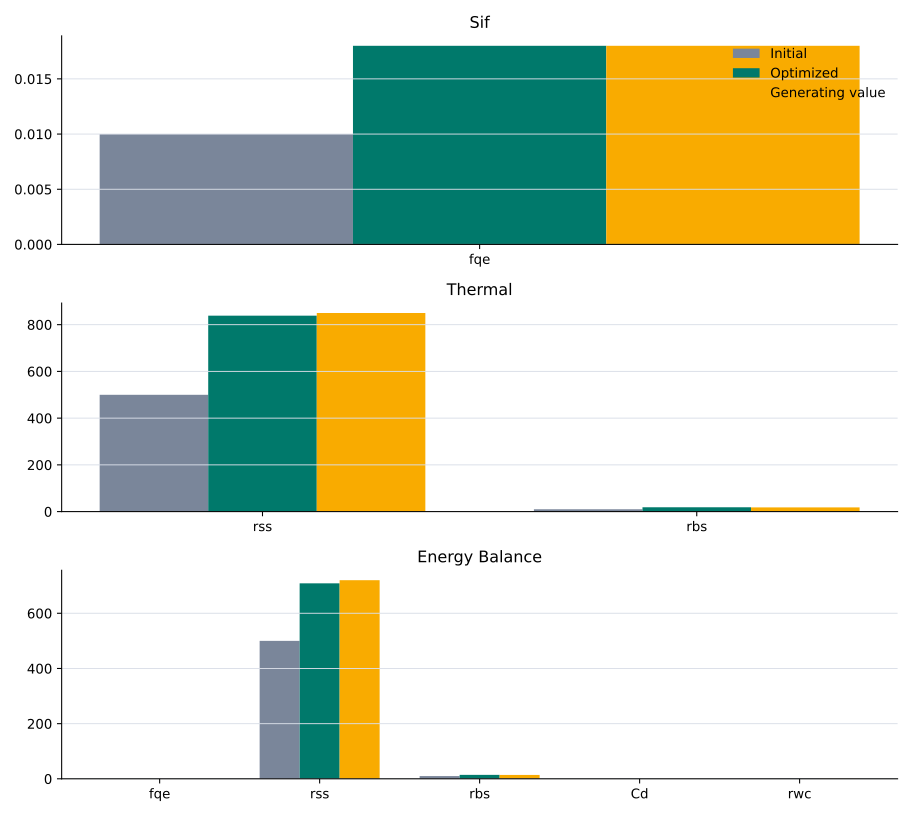
Reading the Outcome
result.optimization_result contains:
| Field | Meaning |
|---|---|
status |
"optimized" when the optimisation branch completed. |
target_variables |
SCOPE output variables used in the loss. |
initial_loss |
Loss from the initial parameter values before fitting. |
optimized_loss |
Loss from the final fitted parameter values. |
parameters_initial |
Physical parameter values used at the start. |
parameters_optimized |
Physical parameter values after fitting. |
optimizer |
Optimiser implementation and method, e.g. scipy:L-BFGS-B. |
converged |
Whether scipy reported convergence. A non-converged fit may still improve the loss but should be reviewed. |
metadata |
Workflow and parameter-count metadata. |
The optimised datasets also include attributes for manifest writers:
result.scope_output_ds.attrs["arc_scope_optimization_status"]
result.scope_output_ds.attrs["arc_scope_optimization_parameters_optimized"]
result.scope_output_ds.attrs["arc_scope_optimization_initial_loss"]
result.scope_output_ds.attrs["arc_scope_optimization_optimized_loss"]
These attributes are intended to prevent optimised and non-optimised runs from looking identical in downstream artifacts.
Practical Checks
Before treating a fit as scientific output, check:
optimized_lossis lower thaninitial_loss.convergedisTrue, or the non-convergence reason is understood from scipy logs.- Fitted parameters are not pinned exactly at lower or upper bounds.
- Target variables and observations use compatible units.
- A hold-out period or independent observation source gives similar behavior.
Optimisation improves agreement with the supplied observations. It does not prove that a parameter is uniquely identifiable or physically true.